

Membership
ABOUT THIS RESOURCE
Description
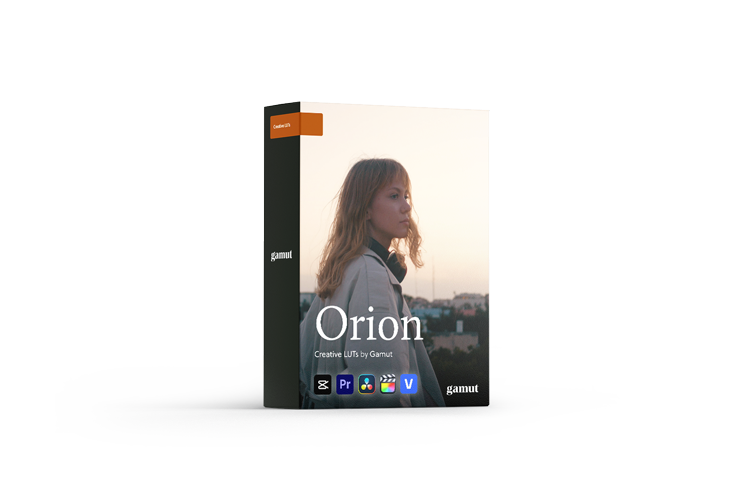
Orion by Gamut, created with JVKE, is a classic film stock emulation LUT collection designed for filmmakers who want natural cinematic color with flexible grading options. The collection emphasizes rich reds, deep blues, dynamic shadows, and gentle highlights while preserving the natural character of the footage.
The pack features three core looks—Classic, Warm, and Cool—with additional Contrast and Crushed variations for each, providing a total of 9 LUTs.
WHAT'S INCLUDED
• Orion
• Orion +CON
• Orion +CRUSH
• Orion (Warm)
• Orion (Warm) +CON
• Orion (Warm) +CRUSH
• Orion (Cool)
• Orion (Cool) +CON
• Orion (Cool) +CRUSH
3 FILM LOOKS
• Orion – Balanced color, clean shadows, and gentle highlights inspired by classic film stocks
• Orion Warm – The warmest variation, inspired by the distinctive appearance of Kodak film pushed an extra stop while maintaining natural skin tones
• Orion Cool – A cooler palette inspired by blue-hour light, useful for balancing overly warm scenes or introducing a subtle cinematic mood
FEATURES
• 9 creative LUTs
• Classic film stock emulation
• Rich reds and deep blues
• Dynamic shadows
• Natural skin tones
• Contrast and Crushed variations for every look
• Designed for Rec.709 footage
• Can be paired with Gamut BaseLUTs to convert Log footage to Rec.709 before applying Orion
• Compatible with mirrorless, DSLR, and cinema cameras
• Non-destructive color workflow
• CUBE format for broad editing and grading software compatibility
FORMAT
• CUBE LUT
COMPATIBILITY
• DaVinci Resolve
• Adobe Premiere Pro
• Final Cut Pro
• CapCut
• Sony Vegas
• Other applications supporting CUBE LUTs
The pack features three core looks—Classic, Warm, and Cool—with additional Contrast and Crushed variations for each, providing a total of 9 LUTs.
WHAT'S INCLUDED
• Orion
• Orion +CON
• Orion +CRUSH
• Orion (Warm)
• Orion (Warm) +CON
• Orion (Warm) +CRUSH
• Orion (Cool)
• Orion (Cool) +CON
• Orion (Cool) +CRUSH
3 FILM LOOKS
• Orion – Balanced color, clean shadows, and gentle highlights inspired by classic film stocks
• Orion Warm – The warmest variation, inspired by the distinctive appearance of Kodak film pushed an extra stop while maintaining natural skin tones
• Orion Cool – A cooler palette inspired by blue-hour light, useful for balancing overly warm scenes or introducing a subtle cinematic mood
FEATURES
• 9 creative LUTs
• Classic film stock emulation
• Rich reds and deep blues
• Dynamic shadows
• Natural skin tones
• Contrast and Crushed variations for every look
• Designed for Rec.709 footage
• Can be paired with Gamut BaseLUTs to convert Log footage to Rec.709 before applying Orion
• Compatible with mirrorless, DSLR, and cinema cameras
• Non-destructive color workflow
• CUBE format for broad editing and grading software compatibility
FORMAT
• CUBE LUT
COMPATIBILITY
• DaVinci Resolve
• Adobe Premiere Pro
• Final Cut Pro
• CapCut
• Sony Vegas
• Other applications supporting CUBE LUTs
Copyright Information
EditBox does not claim ownership of the files shared on this platform. Content is collected from publicly available sources, forums, and third-party websites.
EditBox does not sell ownership or copyright
Membership fees support the operation and maintenance of the platform. Access does not transfer ownership or commercial licensing rights. Users should review the original licensing terms before using any resource commercially.
Related resources
View all
Membership

Membership

Membership
Membership

Membership
Membership
Membership
Membership
Membership

Membership

Membership
Featured services
View all
Google AI Pro 5 TB + Gemini Pro - 1 Year
Google AI Pro 5 TB and Gemini Pro for 12 months, with support and warranty throughout the subscription period.
Google AI Pro 2 TB + Gemini Pro - 1 Year
Google AI Pro 2 TB and Gemini Pro for 12 months as a family-group member.
Google AI Pro 5 TB + Gemini Pro - 18 Months
Official Google AI Pro 5 TB and Gemini Pro for 18 months.