
Membership
ABOUT THIS RESOURCE
Description
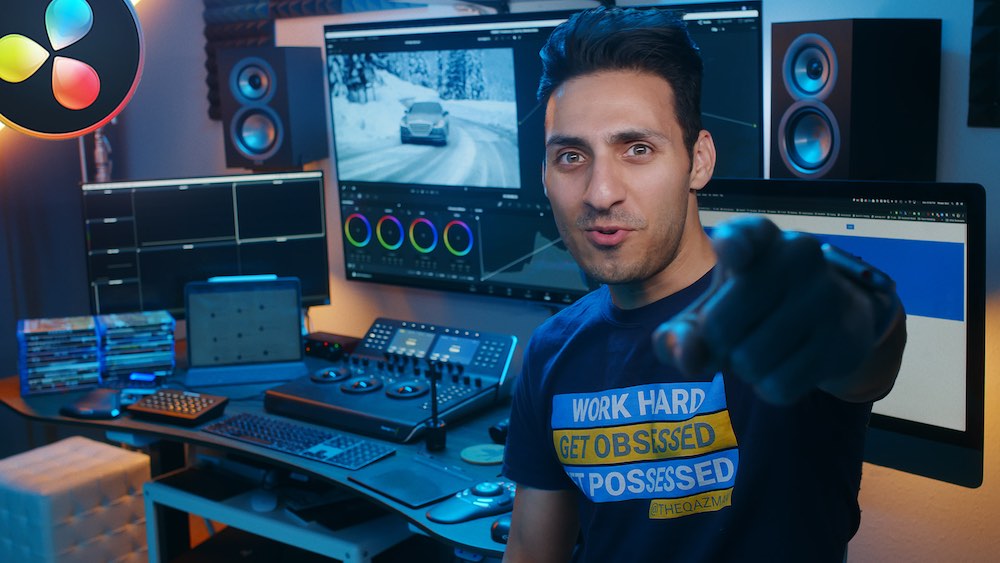
Freelance Colorist Masterclass is Waqas Qazi's comprehensive training program designed to develop both professional color-grading skills in DaVinci Resolve and the business skills required to build a sustainable freelance colorist career.
Rather than focusing only on creating attractive grades, the program covers the broader professional colorist workflow: conforming projects, handling footage from different camera systems, color correction, shot matching, look development, grading-studio setup, delivery, and finding paying clients.
The current program contains approximately 290 lessons with more than 27 hours of content, including 211+ training videos. It is structured around 10 core modules with additional training covering ACES, HDR workflows, film emulation, DaVinci Resolve optimization, and professional project breakdowns.
WHAT YOU'LL LEARN
• Conform projects into and out of DaVinci Resolve
• Work with Round Trip, Bake and Blade, and EDL workflows
• Understand the color science of different camera systems
• Grade footage from ARRI, RED, Canon, Panasonic, Blackmagic, Sony, and DJI cameras
• Read scopes and analyze images accurately
• Correct white balance and exposure
• Understand the difference between color correction and creative grading
• Match shots from the same and different camera systems
• Build cinematic looks without relying entirely on LUTs
• Work with Rec.709 and advanced color-management workflows
• Understand the fundamentals of ACES
• Develop SDR and HDR-ready grading pipelines
• Build structured and efficient node trees
• Create a grading studio for different budgets
• Optimize DaVinci Resolve and your computer for grading
• Prepare professional delivery settings
• Work remotely with clients
• Build a demo reel, website, and professional presence
• Find clients through social media and industry relationships
• Price projects and negotiate rates
• Develop a sustainable freelance colorist career
COURSE CONTENT
MODULE 1 – CONFORM
Learn professional methods for moving projects between editing applications and DaVinci Resolve, including Round Trip, Bake and Blade, camera-original workflows, transcoded media, and pre-conformed EDLs.
MODULE 2 – CAMERAS
Explore the color science and practical grading considerations of different camera systems.
Training includes footage from systems such as ARRI Alexa Mini, RED Dragon, Canon C200, Panasonic GH5, Blackmagic Pocket Cinema Camera 4K, Sony a6500, and DJI Inspire 1.
MODULE 3 – COLOR CORRECTION
Develop the technical foundation required for professional grading.
Topics include scopes, white balance, exposure, image analysis, lookbooks, people, landscapes, products, Rec.709, and practical correction exercises.
MODULE 4 – SHOT MATCHING
Learn how to create visual consistency between shots, including projects captured with multiple cameras and different color sciences.
MODULE 5 – COLOR GRADING
Move beyond technical correction into creative look development and learn how to build popular cinematic looks using DaVinci Resolve without depending on LUTs or third-party plugins.
MODULE 6 – STUDIO SETUP
Learn how to build a grading environment ranging from an entry-level setup to a high-end studio capable of handling 4K projects.
Topics include equipment, system optimization, delivery settings, remote grading, room preparation, and productivity tools.
MODULE 7 – FREELANCE
Learn how to transform grading skills into paid freelance work.
Topics include:
• Demo reels
• Websites
• Social media
• Finding work
• Client outreach
• Content strategy
• High-end client strategies
• Collaboration and networking
• Pricing
• Invoicing
• Rate negotiation
• Working with agencies
• Handling difficult clients
• Building a professional network
MODULE 8 – BONUS
Additional practical lessons cover scopes, clean white looks, skin tones, film looks, gamma shifts, export settings, remote workflows, noise reduction, highlight protection, contrast, saturation, and DaVinci Resolve performance optimization.
MODULE 9 – YOUTUBE
Recreate and study popular looks from Waqas Qazi's educational content, including examples inspired by Joker, John Wick, James Bond, and Parasite.
ACES, HDR & FILM EMULATION
Additional sections explore ACES fundamentals and project setup, SDR/HDR-ready pipelines, LUT stress testing, Printer Lights, HDR node structures, Dolby Vision trims, Resolve Film LUTs, halation, texture, and film-emulation techniques.
PRACTICE & RESOURCES
• Practice footage for multiple lessons
• Project files and course materials
• Sample footage from multiple camera systems
• Module exercises
• Professional project breakdowns
• Look-development exercises
• DaVinci Resolve training resources
• Additional workshops
• Student community access
• Ongoing coaching and educational content
COURSE DETAILS
• Instructor: Waqas Qazi
• Course: Freelance Colorist
• Primary Software: DaVinci Resolve
• Approximately 290 lessons
• 27+ hours of content
• 211+ training videos
• 10 core modules plus additional training sections
• Suitable for beginners through experienced users
• Self-paced learning
• Lifetime course access
• DaVinci Resolve Studio is preferred but not required
• The free version of DaVinci Resolve can be used
• Certification upon successful course completion
WHO IT'S FOR
• Beginners learning professional color grading in DaVinci Resolve
• Editors looking to strengthen their color skills
• Filmmakers interested in color and cinematic look development
• Colorists developing a more professional workflow
• Creators working with footage from multiple camera systems
• Colorists interested in commercials, music videos, documentaries, and films
• Creators looking to turn grading skills into paid freelance work
• Anyone looking to develop both technical grading and client-business skills
Rather than focusing only on creating attractive grades, the program covers the broader professional colorist workflow: conforming projects, handling footage from different camera systems, color correction, shot matching, look development, grading-studio setup, delivery, and finding paying clients.
The current program contains approximately 290 lessons with more than 27 hours of content, including 211+ training videos. It is structured around 10 core modules with additional training covering ACES, HDR workflows, film emulation, DaVinci Resolve optimization, and professional project breakdowns.
WHAT YOU'LL LEARN
• Conform projects into and out of DaVinci Resolve
• Work with Round Trip, Bake and Blade, and EDL workflows
• Understand the color science of different camera systems
• Grade footage from ARRI, RED, Canon, Panasonic, Blackmagic, Sony, and DJI cameras
• Read scopes and analyze images accurately
• Correct white balance and exposure
• Understand the difference between color correction and creative grading
• Match shots from the same and different camera systems
• Build cinematic looks without relying entirely on LUTs
• Work with Rec.709 and advanced color-management workflows
• Understand the fundamentals of ACES
• Develop SDR and HDR-ready grading pipelines
• Build structured and efficient node trees
• Create a grading studio for different budgets
• Optimize DaVinci Resolve and your computer for grading
• Prepare professional delivery settings
• Work remotely with clients
• Build a demo reel, website, and professional presence
• Find clients through social media and industry relationships
• Price projects and negotiate rates
• Develop a sustainable freelance colorist career
COURSE CONTENT
MODULE 1 – CONFORM
Learn professional methods for moving projects between editing applications and DaVinci Resolve, including Round Trip, Bake and Blade, camera-original workflows, transcoded media, and pre-conformed EDLs.
MODULE 2 – CAMERAS
Explore the color science and practical grading considerations of different camera systems.
Training includes footage from systems such as ARRI Alexa Mini, RED Dragon, Canon C200, Panasonic GH5, Blackmagic Pocket Cinema Camera 4K, Sony a6500, and DJI Inspire 1.
MODULE 3 – COLOR CORRECTION
Develop the technical foundation required for professional grading.
Topics include scopes, white balance, exposure, image analysis, lookbooks, people, landscapes, products, Rec.709, and practical correction exercises.
MODULE 4 – SHOT MATCHING
Learn how to create visual consistency between shots, including projects captured with multiple cameras and different color sciences.
MODULE 5 – COLOR GRADING
Move beyond technical correction into creative look development and learn how to build popular cinematic looks using DaVinci Resolve without depending on LUTs or third-party plugins.
MODULE 6 – STUDIO SETUP
Learn how to build a grading environment ranging from an entry-level setup to a high-end studio capable of handling 4K projects.
Topics include equipment, system optimization, delivery settings, remote grading, room preparation, and productivity tools.
MODULE 7 – FREELANCE
Learn how to transform grading skills into paid freelance work.
Topics include:
• Demo reels
• Websites
• Social media
• Finding work
• Client outreach
• Content strategy
• High-end client strategies
• Collaboration and networking
• Pricing
• Invoicing
• Rate negotiation
• Working with agencies
• Handling difficult clients
• Building a professional network
MODULE 8 – BONUS
Additional practical lessons cover scopes, clean white looks, skin tones, film looks, gamma shifts, export settings, remote workflows, noise reduction, highlight protection, contrast, saturation, and DaVinci Resolve performance optimization.
MODULE 9 – YOUTUBE
Recreate and study popular looks from Waqas Qazi's educational content, including examples inspired by Joker, John Wick, James Bond, and Parasite.
ACES, HDR & FILM EMULATION
Additional sections explore ACES fundamentals and project setup, SDR/HDR-ready pipelines, LUT stress testing, Printer Lights, HDR node structures, Dolby Vision trims, Resolve Film LUTs, halation, texture, and film-emulation techniques.
PRACTICE & RESOURCES
• Practice footage for multiple lessons
• Project files and course materials
• Sample footage from multiple camera systems
• Module exercises
• Professional project breakdowns
• Look-development exercises
• DaVinci Resolve training resources
• Additional workshops
• Student community access
• Ongoing coaching and educational content
COURSE DETAILS
• Instructor: Waqas Qazi
• Course: Freelance Colorist
• Primary Software: DaVinci Resolve
• Approximately 290 lessons
• 27+ hours of content
• 211+ training videos
• 10 core modules plus additional training sections
• Suitable for beginners through experienced users
• Self-paced learning
• Lifetime course access
• DaVinci Resolve Studio is preferred but not required
• The free version of DaVinci Resolve can be used
• Certification upon successful course completion
WHO IT'S FOR
• Beginners learning professional color grading in DaVinci Resolve
• Editors looking to strengthen their color skills
• Filmmakers interested in color and cinematic look development
• Colorists developing a more professional workflow
• Creators working with footage from multiple camera systems
• Colorists interested in commercials, music videos, documentaries, and films
• Creators looking to turn grading skills into paid freelance work
• Anyone looking to develop both technical grading and client-business skills
Copyright Information
EditBox does not claim ownership of the files shared on this platform. Content is collected from publicly available sources, forums, and third-party websites.
EditBox does not sell ownership or copyright
Membership fees support the operation and maintenance of the platform. Access does not transfer ownership or commercial licensing rights. Users should review the original licensing terms before using any resource commercially.
Related resources
View all
Membership

Membership
Membership
Membership
Membership
Membership
Membership
Membership

Membership

Membership

Membership
Featured services
View all
Google AI Pro 5 TB + Gemini Pro - 1 Year
Google AI Pro 5 TB and Gemini Pro for 12 months, with support and warranty throughout the subscription period.
Google AI Pro 2 TB + Gemini Pro - 1 Year
Google AI Pro 2 TB and Gemini Pro for 12 months as a family-group member.
Google AI Pro 5 TB + Gemini Pro - 18 Months
Official Google AI Pro 5 TB and Gemini Pro for 18 months.